Select Quantity
Open the quantity field inside the POS transaction screen.
Connect compatible RS232 electronic weighing machines to supported POS software for automated weight capture, pricing and quantity input. Reduce manual calculations, speed up checkout and lower transaction errors.
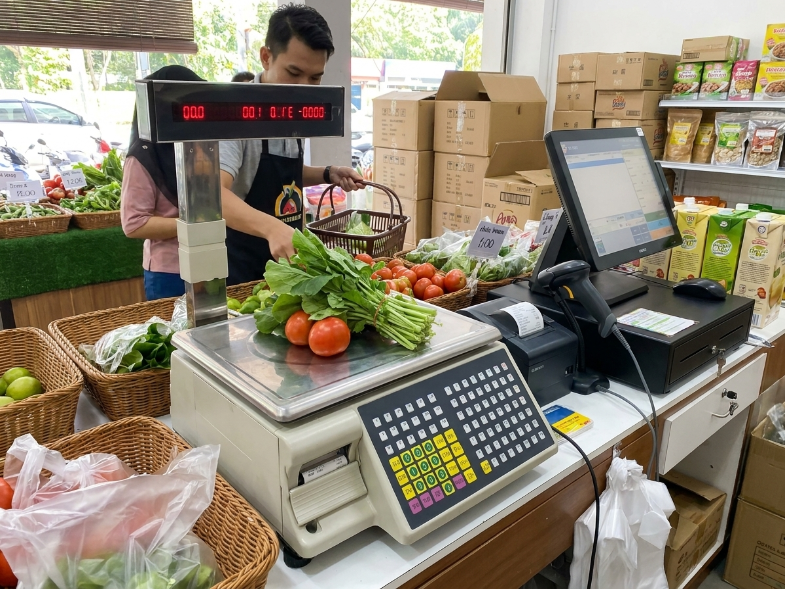
Weight is captured from the electronic scale and sent into the supported POS workflow, helping your team complete weighing-based sales faster and more accurately.
Open the quantity field inside the POS transaction screen.
Click the weighing machine icon to request the live measurement.
Confirm the captured measurement from the electronic scale.
The value is assigned to the POS quantity field for checkout.
The integration of weight scales with POS systems is widely applicable in retail, grocery stores, restaurants, manufacturing, shipping, logistics and many other business environments.
Ensures accurate pricing, inventory tracking and reduced human error at checkout.
Tracks inventory accurately and helps prevent overstocking or understocking of materials and finished products.
Weigh ingredients and calculate food costs accurately for preparation, portioning and cost control.
Supports package weighing, inventory movement and operational accuracy for logistics teams.
By reducing manual entry and calculation, POS scale integration helps improve counter speed, transaction accuracy and the customer checkout experience.
Tell us your POS setup, scale model, counter workflow and checkout requirements. Our team can advise whether your weighing scale can support POS integration.
Tell us the capacity you need and how you will use it. We will come back with the right model, the price, and calibration arrangements.